InsightS
Tips & Tricks for design drawing mastery in Thailand
Each IP office has its own set of rules when it comes to design drawings and views requirements. In Thailand, the Department of Intellectual Property has stringent conditions, even more so since design applications can be submitted through e-filing. The present article will give an overview of all the rules pertaining to graphic format that a design application should follow.
How many views should be submitted and from which angle?
Essentially, it is mandatory to submit drawings from 7 views: front, back, top, bottom, right, left, and perspective. These drawings should portray the product in its entirety in the same state, whether open or closed, and ensure that the proportions of each side correspond to the actual view. For example, in the case of a pen or a bottle, the top and bottom views must be proportionally smaller than the other views.
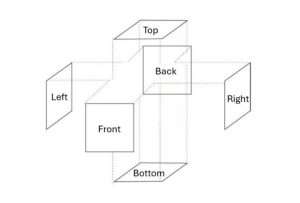
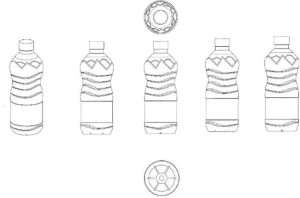
Preparing the application for a design patent, Mr. Danai Liangcharoen, Expert patent examiner
However, the exact number of drawings required can vary, contingent upon the nature of the product and the clarity achieved through the initial views. For instance, vehicles like cars or motorcycles may not necessitate a bottom view for protection.
If the initial 7 views are insufficient to provide a clear understanding of the product, additional drawings, such as alternative perspective views from the top or bottom, or views of the product in different states (e.g. folded) may be included to clarify the use or specific features of the product.
It is crucial to emphasize that legal protection only extends to the initial 7 views submitted. Any additional drawings are solely intended to enhance the examiner’s understanding of the product design. Notably, when filing through the e-filing system, the number of drawings that can be uploaded is capped at 10.
Rules applying for all design applications for products
– Drawings or photos
Both drawings and photos are acceptable for submission, depending on which effectively illustrates the product’s components. However, opting for drawings is advisable, as they provide clearer depictions and usually do not display light shadows or opacity, which can obscure details in photography. These occlusions often prompt examiners to issue office actions.
Indeed, both drawings and photos should be devoid of shadings, reflections, and placed against a white background. Shadowing is only accepted for curved planes and must be illustrated as thin lines used exclusively in the perspective views.
It is important to ensure that drawings maintain consistent solid black lines. There is no necessity to include dimensions or text describing the parts or material. If there are trademarks present, they must be either removed or disclaimed in the claim.
– Black and white or color
When selecting colors, it is essential to consider the scope of protection. If applicants prefer their design to be protected solely in specific colors, they can do so by submitting drawings or photos in those colors and claiming them. The protection will then be provided to the design, exclusively in the chosen colors.
Conversely, broader protection can be obtained by submitting black and white drawings/photos and disclaiming colors, as this extends protection to all color variations, a practice followed by the majority of applicants.
– Definition/resolution
The drawings or photos should have sufficient definition and resolution to ensure a clear illustration of the product’s components when filed on paper. Similarly, they should not fracture or become pixelated when zoomed in, if the application is submitted via e-filing.
When filing through the e-filing system, the views can only be uploaded in PNG or JPG format, with a resolution of around 300dpi for a size of 15cm*15cm (equivalent to 1772 pixels), and the file size should not exceed 50MB.
Rules applying for the design of specific products
– Products which have transparent parts
Products with transparent parts should display transparency using thin, parallel lines. However, these lines should not obscure each part of the design.
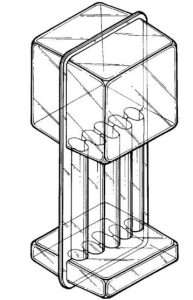
Inspection manual for the application for design patents,
Thai department of intellectual property (January 2011)
– Products whose shape can change according to their use
When products can alter their shape based on their usage, such as in the open or folded stages (e.g., foldable phones or strollers), the initial 7 views should depict the product in its open stage. Additionally, an extra perspective view is required to illustrate the product in its closed stage.
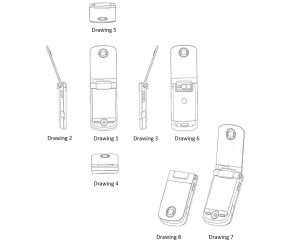
Inspection manual for the application for design patents,
Thai department of intellectual property (January 2011)
– Products which have spare parts that can be assembled
If the designed product comprises separate spare parts that require assembly for use, such as door locks or construction parts, it must be depicted in its fully assembled state when filing. Each piece should remain unobscured by others.

Inspection manual for the application for design patents,
Thai department of intellectual property (January 2011)
Specific rules for design applications for patterns
– Patterns on shaped product
For patterns on shaped products, such as those on bowls or shirts, the drawings or photo views can be provided in the same manner as for general design products, including various angles, and a perspective view. In the case of a pattern on a shirt laid out flat, only the front and back views are necessary. If the pattern on the front and back is identical, only the front view is required.
– Pattern on fabric
Patterns on fabric consist of repeating patterns. A single drawing illustrating the repeating pattern section is sufficient, with angle indicators placed at the corners as follows:
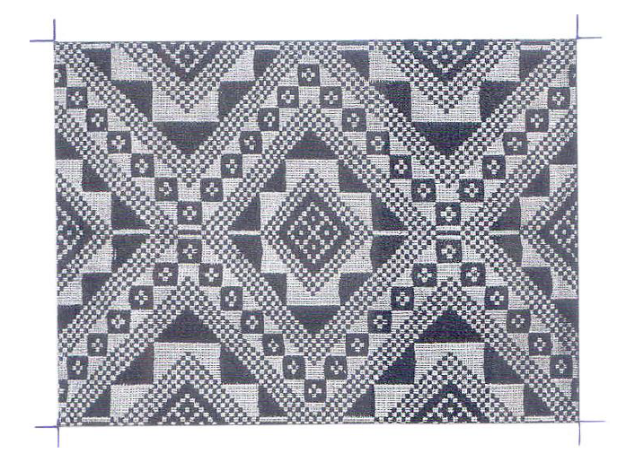

Inspection manual for the application for design patents,
Thai department of intellectual property (January 2011)
Specific rules for design applications for Graphical User Interface
In Thailand, a Graphical User Interface (GUI) can be protected. However, for each application, only one screenshot, whether displayed on a computer, mobile device, or any other electronic equipment, can be submitted. If there are multiple screenshots or display screens, each must be filed separately. It is recommended to file multiple applications individually but simultaneously, especially if the screenshots are related or part of the same application, program or website.
– A screenshot captured within a mobile application:
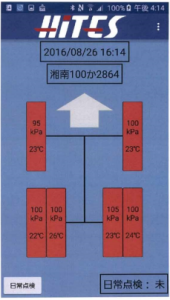
Application No.: 1702000617
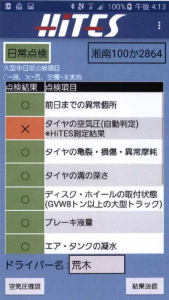
Application No.: 1702000618
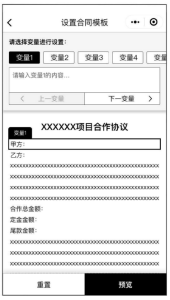
Application No.:2102003750
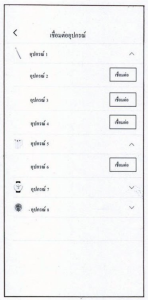
Application No.: 1902003922
– A screenshot captured within a computer:
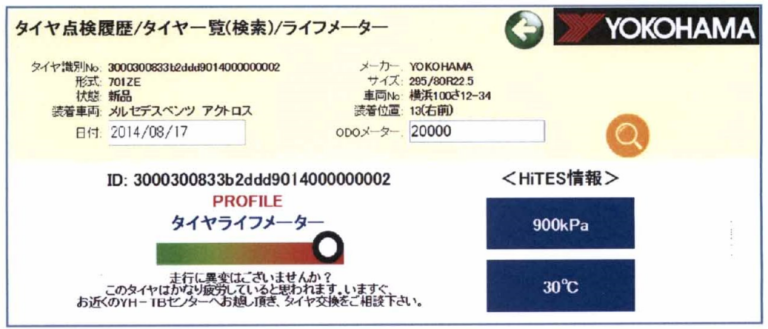
Application No.: 1702000619
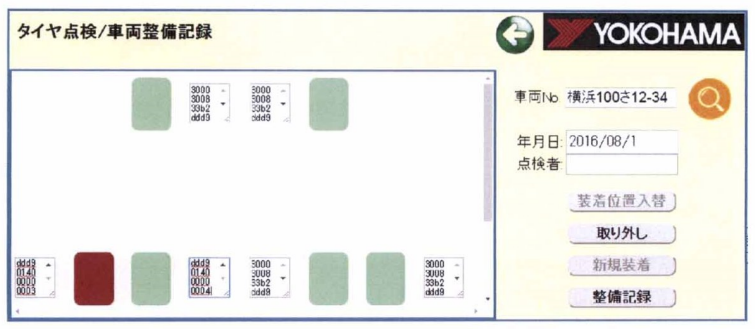
Application No.: 1702000620
– A display screen featured on electronic equipment:
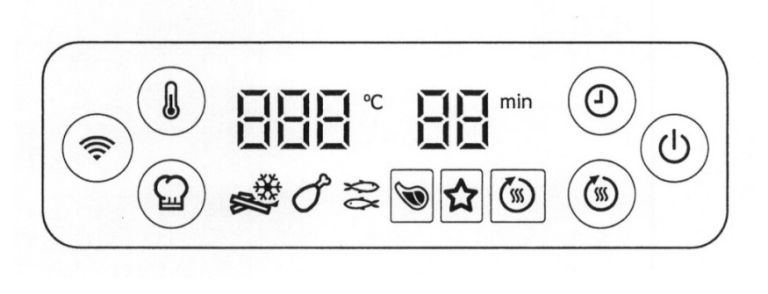
Application No.: 1602003463
References:
– Inspection Manual For the application for Design Patents
– Preparing the application for a design patent, by Mr. Danai Liangcharoen, Expert patent examiner